StoryLyne: Free Screenwriting Software & Free Scriptwriting Software
StoryLyne: Free Screenwriting Software & Free Scriptwriting Software for Filmmakers
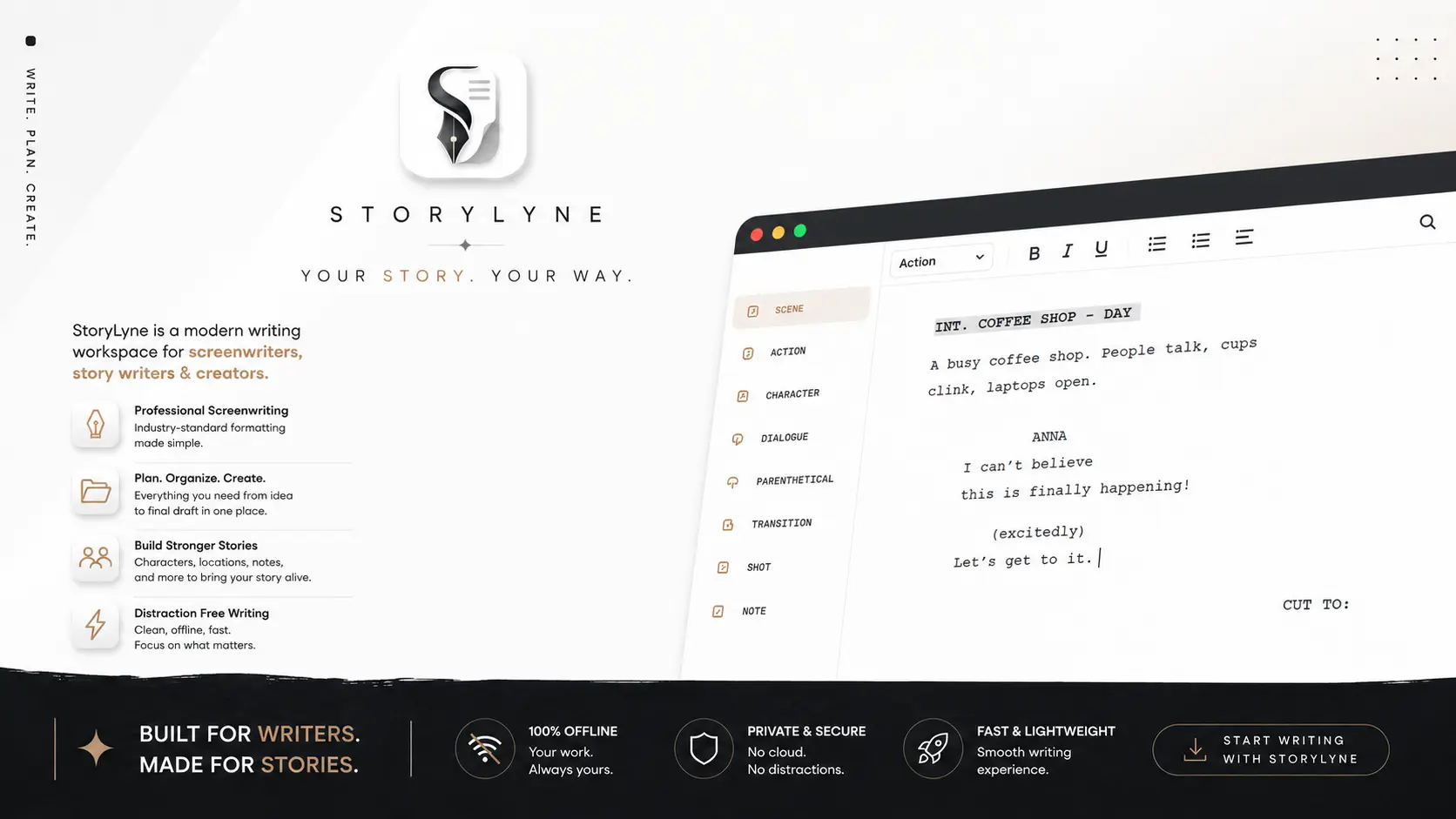
Looking for free screenwriting software, free scriptwriting software, or a free Celtx alternative? StoryLyne is a 100% free, offline-first screenwriting and film pre-production workspace built for screenwriters, filmmakers, directors, students and storytellers.
What Is StoryLyne?
StoryLyne is a free screenwriting software designed to take a film project from the first idea to a finished screenplay and into pre-production.
Unlike a basic text editor, StoryLyne combines professional screenplay formatting with character development, scene management, locations, moodboards, beat boards, production notes, budget tracking, checklists, timelines and document attachments.
The idea is simple: writers should be able to write without worrying about subscriptions, paywalls or an internet connection.
StoryLyne is 100% free, works completely offline, requires no login and keeps your projects on your local computer. The official product page describes it as a local workspace where your scripts, characters, notes and other creative files remain on your machine.
If you have been searching for free scriptwriting software, free screenplay writing software, free screenplay software, offline screenwriting software, or a free filmmaking tool, StoryLyne is built around exactly those needs.
Is StoryLyne Really Free Screenwriting Software?
Yes.
StoryLyne is presented as 100% free screenwriting software with no subscriptions, no paywalls and no premium tiers. According to the official StoryLyne page, every feature is available to every user, forever.
There is no monthly payment simply to continue writing your screenplay.
There is no mandatory account.
There is no requirement to stay connected to the internet while writing.
That makes StoryLyne particularly useful for:
- Beginner screenwriters
- Independent filmmakers
- Short-film creators
- Film students
- Directors
- Screenwriting teams
- Writers developing original intellectual property
- Filmmakers working with limited budgets
- Anyone looking for free filmmaking tools
The philosophy behind StoryLyne is straightforward: give writers the tools to write, without putting the writing experience behind a subscription.
StoryLyne is also licensed for both personal and commercial creative projects. Its current license allows users to create films, series and plays using the software.
Why Do You Need Dedicated Screenwriting Software?
You can technically write a screenplay in a normal word processor. But a screenplay is not a normal document.
Scene headings, action, character names, dialogue, parentheticals, transitions, pagination and page layout follow established screenplay conventions. Dedicated screenwriting software exists to automate much of that formatting.
That is why a proper free screenplay editor can be much more useful than trying to manually build a screenplay in a general word processor.
StoryLyne automatically formats screenplay elements as you write. The official product page describes industry-standard auto-formatting for scene headings, action lines and dialogue.
Instead of constantly thinking, “How should I format this?” you can concentrate on, “What happens next?”
For anyone searching for free screenwriting software, that difference matters. Good screenwriting software should disappear into the background and let the writer focus on the story.
Free Screenwriting Software With Professional Formatting
StoryLyne includes automatic screenplay formatting designed around professional screenplay conventions.
The writing environment handles elements such as:
- Scene headings
- Action
- Character cues
- Dialogue
- Parentheticals
- Page formatting
- Pagination
- Scene structure
The official product page also describes production-ready PDF and DOCX exports, along with compatibility with Final Draft .fdx, Fountain and plain-text formats.
This means StoryLyne isn't simply a free script writing software that gives you a blank page. It is designed specifically around the screenplay workflow.
For writers who are searching for free screenplay writing software, automatic formatting can remove a huge amount of unnecessary technical work.
StoryLyne: A Free Celtx Alternative
One of the biggest searches in the screenwriting-software space is “Celtx alternative.” Another is “Free Celtx alternative.”
Celtx is a well-established screenwriting and pre-production platform. Its current free plan provides a screenplay editor and other writing capabilities, with the free tier limited to one project. Celtx describes its current workflow as cloud-based, with browser access and collaboration features.
StoryLyne takes a different approach. It is designed as an offline screenwriting software that operates locally on your computer.
That makes StoryLyne particularly relevant if you're searching for a free Celtx alternative with:
- Offline writing
- Local project storage
- No mandatory login
- No subscription
- Professional screenplay formatting
- Character management
- Scene management
- Moodboards
- Beat boards
- Budget tracking
- Production timelines
- Work checklists
- Document attachments
Celtx can be a strong choice for writers who want cloud collaboration and browser-based access. StoryLyne is aimed at writers who want a local, private and offline filmmaking workspace.
StoryLyne vs Celtx
There is no universal answer to which screenwriting software is “best.” The right choice depends on your workflow.
Celtx's current free offering provides a cloud-based screenplay editor and supports collaboration, while its free users are limited to one project. StoryLyne is designed around a local desktop workflow.
StoryLyne
- 100% free
- Offline-first
- No login
- Local project files
- Screenplay auto-formatting
- Character Manager
- Location Manager
- Scene Management
- Moodboards
- Beat Board
- Budget Tracker
- Work Checklist
- Production Timeline
- Document attachments
- Local version history
- PDF and DOCX export
- Final Draft FDX, Fountain and plain-text export
Celtx Free
- Cloud-based workflow
- Free screenplay editor
- Collaboration features
- One-project limit on the free plan
- Browser-based access
- Additional production features available across its broader platform and plans
If your priority is online collaboration, Celtx may be the better fit. If your priority is free offline screenwriting software, StoryLyne is designed specifically around that workflow.
Why Offline Screenwriting Software Matters
Your screenplay shouldn't stop working because the internet does.
You might be writing on a flight, on a film set, in a remote location, while travelling, at a café, at home with unreliable internet, or somewhere you simply want to work without distractions.
StoryLyne works completely offline. The official product page states that no internet connection is required and that your projects remain on your local hard drive.
That makes StoryLyne useful not only as free screenwriting software, but also as an offline filmmaking tool.
There is another important advantage: privacy. Unreleased screenplays can contain intellectual property, original characters, film concepts, commercial ideas and confidential production information.
StoryLyne's privacy policy states that it does not collect, store or transmit personal data and that projects, scripts, characters and notes remain exclusively on the user's local hard drive.
For writers who want control over their own files, local storage can be an important part of the writing workflow.
Your Entire Film Project in One Place
A screenplay is only one part of filmmaking.
Once you start preparing a film, you also need character information, locations, props, visual references, story notes, shot ideas, production notes, research, budgets, checklists, shooting timelines, documents and editing notes.
StoryLyne is designed to keep these elements inside the same project.
The official product page describes a unified project workspace containing the script, characters, locations, story notes, shot lists, editing notes, production notes, research and documents.
This is what makes it different from a simple free screenplay editor. It is intended to be a complete creative workspace for independent filmmaking.
Character Manager for Screenwriters
Great screenwriting depends on believable characters.
StoryLyne includes a Character Manager for developing detailed character profiles, biographies, references, relationships and character arcs.
Instead of keeping character information in a completely separate document, you can keep it connected to your screenplay project.
This is particularly useful for feature films, short films, series, character-driven dramas, psychological thrillers, horror projects and student films.
For writers searching for free screenwriting software with character development, this gives StoryLyne an advantage over a basic writing application.
Location Manager for Filmmakers
The screenplay tells you where a scene happens. The production has to find that place.
StoryLyne includes a Location Manager for organizing sets and real-world locations, adding scouting references and connecting locations to scenes.
The official product page also describes location reports generated from screenplay slug lines, helping bridge the gap between script development and physical production.
The workflow becomes: Script → Scene → Location → Production
For independent filmmakers, this is especially useful because the writer and director are often the same person.
Scene Management
A screenplay can become difficult to understand when you're looking at hundreds of pages of text.
StoryLyne provides scene management and visual scene cards so writers can see the structure of their story more clearly.
Scenes can be reorganized visually to experiment with pacing and narrative order. This can be extremely useful during rewriting.
Sometimes the problem with a screenplay isn't the scene itself. The problem is where the scene is placed. Visual scene management makes those structural decisions easier to see.
Moodboards and Visual References
Filmmaking is visual.
Before shooting, filmmakers often collect references for lighting, colour, locations, costumes, production design, camera style, character appearance, atmosphere and composition.
StoryLyne includes moodboards and visual references so these ideas can live alongside the screenplay. The official product page describes local moodboards, reference images and scene-level visual development.
This makes it a useful free filmmaking tool for directors and visual storytellers who want their creative references close to the written story.
Beat Board and Story Structure
StoryLyne includes a visual Beat Board for developing story structure.
You can map major plot points, acts, sequences, story beats, turning points and character moments.
The software also includes structural templates based on approaches such as Save the Cat and Hero's Journey.
These frameworks aren't rules. They're tools. A writer can use them to understand story structure while still creating something completely original.
For someone searching for free screenwriting software with beat sheet tools, this is another area where StoryLyne goes beyond a basic screenplay editor.
Budget Tracking for Independent Filmmakers
A screenplay eventually becomes a production.
A scene can look inexpensive on the page but become expensive on set because of locations, performers, vehicles, night shooting, lighting, props, production design, travel or equipment.
StoryLyne includes a built-in Budget Tracker for monitoring production costs inside the project.
For an independent filmmaker, this can be more useful than a simple free scriptwriting software application because it connects the screenplay to the realities of production.
Work Checklist and Production Timeline
Filmmaking involves hundreds of small tasks.
StoryLyne includes a Work Checklist and Production Timeline for organizing pre-production tasks, milestones and shooting plans.
You can use the project workspace to think through pre-production, location preparation, production milestones, shooting days, documents, planning steps and other project responsibilities.
For small film crews, student productions and short films, having these tools close to the screenplay can reduce the number of separate files and applications required.
Attach Documents to Your Film Project
Film productions generate documents: research PDFs, contracts, call sheets, production notes, reference material and story documents.
StoryLyne lets you attach documents directly to your project.
The official product page specifically lists contracts, call sheets and research PDFs as examples of files that can be attached to a project.
This helps create a single workspace for the screenplay and the material surrounding it. That is why StoryLyne can reasonably be considered a free filmmaking software and free film pre-production tool, not simply a screenplay editor.
Free Screenwriting Software for Windows and Mac
StoryLyne is available for Windows and Mac. The current product page lists both platforms and identifies the software as version 1.0.2.
It is designed as a dedicated desktop application rather than a browser-only writing environment.
That makes it suitable for writers searching for free screenwriting software for Windows or free screenwriting software for Mac.
The application is also designed to be lightweight, making it suitable for filmmakers who don't have a high-end workstation dedicated only to screenwriting.
Free Scriptwriting Software for Beginners
If you're writing your first screenplay, the biggest challenge should be learning storytelling, not paying for software.
StoryLyne can be used by beginner screenwriters to practice screenplay formatting, scene writing, character development, story structure, beat sheets, visual storytelling, rewriting and film pre-production.
For students and first-time filmmakers, having free scriptwriting software removes one unnecessary barrier between an idea and the first draft.
StoryLyne for Short Film Writers
Short films are one of the best ways to learn filmmaking. They force you to understand economy of storytelling, character motivation, visual communication, scene construction, pacing, sound, editing and production limitations.
StoryLyne is particularly useful for short films because the same project can move from Idea → Outline → Script → Pre-Production → Final Draft → Ready to Shoot.
You can keep the screenplay, character profiles, locations, moodboards, budget and production notes together.
For creators searching for a free filmmaking tool for short films, that workflow can be valuable.
StoryLyne for Independent Filmmakers
Independent filmmakers often have to do several jobs at once. The director may also be the writer. The writer may also be the producer. The producer may be handling locations. The cinematographer may also be involved in visual development.
When a small team works this way, organization becomes extremely important.
StoryLyne is designed for this environment. Instead of having separate files for the script, characters, locations, budget, moodboard, research and production plan, you can keep much of the project's structure inside one StoryLyne project.
That is the larger idea behind this free screenwriting and filmmaking software.
StoryLyne vs Microsoft Word for Screenwriting
Microsoft Word is a general-purpose word processor. StoryLyne is dedicated to screenwriting and filmmaking.
You can write a screenplay in Word, but screenplay formatting generally requires more manual work.
Dedicated free screenwriting software automates screenplay elements so the writer can concentrate on the story.
If you only need to type text, Word may be enough. If you want to write, format and organize a film project, dedicated screenwriting software is a better fit.
StoryLyne vs Google Docs for Screenwriting
Google Docs is useful for general collaboration, but it wasn't created specifically as professional screenwriting software.
StoryLyne is built around screenplay formatting, character development, scene management, visual development, film pre-production and offline writing.
The operating model is also different. Google Docs is cloud-based. StoryLyne is designed to work offline and store projects locally.
So if your priority is browser collaboration, Google Docs can be useful. If your priority is free offline screenwriting software, StoryLyne is designed for that purpose.
Why Free Does Not Have to Mean Basic
The word “free” sometimes creates the impression that software must be limited. StoryLyne takes a different approach.
The software combines:
- Free screenplay writing
- Automatic screenplay formatting
- Character development
- Scene management
- Location management
- Moodboards
- Beat boards
- Budget tracking
- Production timelines
- Work checklists
- Document attachments
- Local version history
- Export tools
That is a much broader workflow than simply opening a blank page and typing. StoryLyne is designed to give filmmakers a complete starting point without a monthly software bill.
What Is the Best Free Screenwriting Software?
There is no single answer for every writer.
Some writers need real-time collaboration. Some want cloud synchronization. Some want AI features. Some want advanced production management. Some want the simplest possible writing environment. Some want everything stored locally.
The best free screenwriting software is ultimately the software that matches your workflow.
If you want offline writing, local project files, no subscription, no mandatory account, professional screenplay formatting, character development, scene organization, visual planning and production tools, then StoryLyne is designed specifically around those needs.
Free Screenwriting Software vs Free Scriptwriting Software
People commonly search for both free screenwriting software and free scriptwriting software. In everyday usage, the terms overlap.
Screenwriting usually refers specifically to writing for film and television. Scriptwriting is a broader term that can include film, television, theatre, advertisements, web videos and other scripted formats.
For filmmakers, the underlying requirement is usually the same: a tool that helps you write and format a professional script.
StoryLyne is designed for that workflow. So whether you search for free screenwriting software, free scriptwriting software, free screenplay software, or free script writing software, StoryLyne is built to support the same core creative process.
Frequently Asked Questions About StoryLyne
Is StoryLyne completely free?
Yes. StoryLyne is presented as 100% free screenwriting software with no subscriptions, premium tiers or paywalls.
Is StoryLyne free forever?
Yes. The official StoryLyne product page describes StoryLyne as free forever.
Is StoryLyne really free scriptwriting software?
Yes. StoryLyne is designed as free scriptwriting software for screenwriters, filmmakers and storytellers.
Does StoryLyne work without internet?
Yes. StoryLyne operates entirely offline.
Does StoryLyne require a login?
No. The official product page states that no login is required.
Is StoryLyne a free Celtx alternative?
Yes. StoryLyne can be considered a free Celtx alternative, particularly for writers who prefer an offline and local-first workflow.
Is StoryLyne better than Celtx?
It depends on your workflow. Celtx is useful for cloud-based collaboration and online production workflows. StoryLyne focuses on free offline writing, local project ownership and an integrated desktop filmmaking workspace.
Is StoryLyne available for Windows?
Yes. StoryLyne is available for Windows.
Is StoryLyne available for Mac?
Yes. StoryLyne is available for Mac.
Can StoryLyne automatically format a screenplay?
Yes. StoryLyne includes industry-standard automatic screenplay formatting.
Can I export my screenplay?
Yes. StoryLyne supports PDF and DOCX export and also describes Final Draft FDX, Fountain and plain-text export options.
Can StoryLyne be used for commercial films?
Yes. StoryLyne's current license allows use for personal and commercial projects, including films, series and plays.
Are my StoryLyne projects stored online?
No. StoryLyne is designed as a local, offline application. Its privacy policy states that projects, scripts, characters and notes remain on the local hard drive.
Is StoryLyne a free filmmaking tool?
Yes. StoryLyne includes screenplay writing as well as filmmaking and pre-production features such as locations, moodboards, budgets, checklists, timelines and document attachments.
Is StoryLyne good for short films?
Yes. StoryLyne is suitable for short-film development and independent filmmaking.
Is StoryLyne good for beginner screenwriters?
Yes. Automatic screenplay formatting reduces technical work and allows beginners to concentrate on story, scenes and characters.
Final Verdict: A Free Screenwriting Software Built for Filmmakers
If you are searching for free screenwriting software, free scriptwriting software, free screenplay writing software, free screenplay editor, free screenplay software, Celtx alternative, free Celtx alternative, offline screenwriting software, free filmmaking software or a free filmmaking tool, StoryLyne was built for you.
It combines professional screenplay formatting with the tools filmmakers actually need around the screenplay: characters, scenes, locations, moodboards, beat boards, budgets, production checklists, timelines, documents and local project management.
Most importantly, StoryLyne is designed to be 100% free and fully offline.
No subscription. No premium tier. No mandatory login. No permanent internet connection.
Just your computer, your project and your story.
The goal isn't to create another complicated software ecosystem. The goal is to give filmmakers a place to write.
Because filmmaking shouldn't begin with “Which software can I afford?” It should begin with “What story do I want to tell?”
Start Writing With StoryLyne
If you're looking for free screenwriting software, free scriptwriting software, a free filmmaking tool, or a free Celtx alternative, explore StoryLyne and start building your next project.
StoryLyne — Free Screenwriting Software